Adding React to Ghost
My goal is to add a payments integration to my ghost theme. I'm doing that by loading a react app within one of my theme's pages that will communicate with an external API.

I really enjoy hosting my site with ghost, and there are a lot of different integrations that can be used to extend functionality. I've been wanting to add a "store", but want something more functional than most of the current integration's "buy now" buttons.
I figured a full-fledged solution with a payment provider such as square or stripe would work well; however, Ghost uses handlebar templates and doesn't have a good solution for that kind of integration.
Enter React. I recently created an API that handles post publishes to X and Mastodon, so the goal is to extend the API to support payments while using a react front-end for my store inside of the ghost theme.
Setup
My theme's based off of the official starter theme, and hasn't changed much. I wanted to keep my API, theme, and react files all in a single repo though, so I restructured things a bit:
- Repo
  - API (My .Net API)
    - Api
    - Core
    - Domain
    - Infrastructure
  - Theme (The starter ghost theme)
    - assets
    - members
    - partials
    - store (My react app)
The store directory was created by setting up a base react app using Vite
Config
Next, I had to update the rollup.config.js used by ghost to build the theme and combine all of the files. Three additional plugins were installed:
npm install -D @svgr/rollup @rollup/plugin-replace @rollup/plugin-urlAnd the changes from the starter config were as follows:
// original imports
...

import svgr from '@svgr/rollup';
import replace from '@rollup/plugin-replace';
import url from '@rollup/plugin-url';

export default defineConfig([
  // original ghost config
  ...,

    {
        input: 'store/src/main.jsx',
        output: {
            dir: 'assets/built/store',
            sourcemap: true,
            format: 'iife',
            plugins: [terser()]
        },
        plugins: [
            replace({
                'process.env.NODE_ENV': JSON.stringify(process.env.BUILD === 'production' ? 'production' : 'development'),
                preventAssignment: true,
            }),
            commonjs(),
            nodeResolve(),
            svgr(),
            url({
                include: ['**/*.svg', '**/*.png', '**/*.jpg', '**/*.jpeg', '**/*.gif', '**/*.webp'],
                limit: 0,
                fileName: 'assets/[name][extname]',
                publicPath: '/assets/built/store/',
            }),
            babel({
                babelHelpers: 'bundled',
                presets: [
                    '@babel/preset-env',
                    ['@babel/preset-react', {
                        runtime: 'automatic'
                    }]
                ],
                exclude: 'node_modules/**'
            }),
            postcss({
                extract: 'main.css',
                sourceMap: true,
                plugins: [
                    atImport(),
                    postcssPresetEnv({})
                ],
                minimize: true
            }),
            terser(),
            process.env.BUILD !== "production" && livereload({
                watch: resolve('.'),
                extraExts: ['hbs'],
                exclusions: [resolve('node_modules')]
            }),
        ]
    }
])
Going into a bit more detail, we have
Plugin-Replace
import replace from '@rollup/plugin-replace';

...

replace({
  'process.env.NODE_ENV': JSON.stringify(process.env.BUILD === 'production' ? 'production' : 'development'),
  preventAssignment: true,
}),
This section replaces any instances of process.env.NODE_ENV with the string value during build. This was used to resolve an issue where trying to load the react app resulted in Uncaught ReferenceError: process is not defined
SVGR
import svgr from '@svgr/rollup';

...

svgr(),
svgr() simply allows the build process to read the svg files during build. This was required since the default react / vite app has svg logos being imported
URL
import url from '@rollup/plugin-url';

url({
  include: ['**/*.svg', '**/*.png', '**/*.jpg', '**/*.jpeg', '**/*.gif', '**/*.webp'],
  limit: 0,
  fileName: 'assets/[name][extname]',
  publicPath: '/assets/built/store/',
}),
url() is copying all of the assets from my /store/src/assets directory during the build process, making them available to the react app when it actually loads
Template
Finally, I had to update my store.hbs template to utilize the react app.
{{!< default}}
<div class="gh-page">
    <div class="gh-container">
        <div id="root"></div>
        <link rel="stylesheet" href={{asset "built/store/main.css"}}>
        <script src={{asset "built/store/main.js"}}></script>
    </div>
</div>
This uses the default template for the page, and then adds the content via my react app with included styles
Result
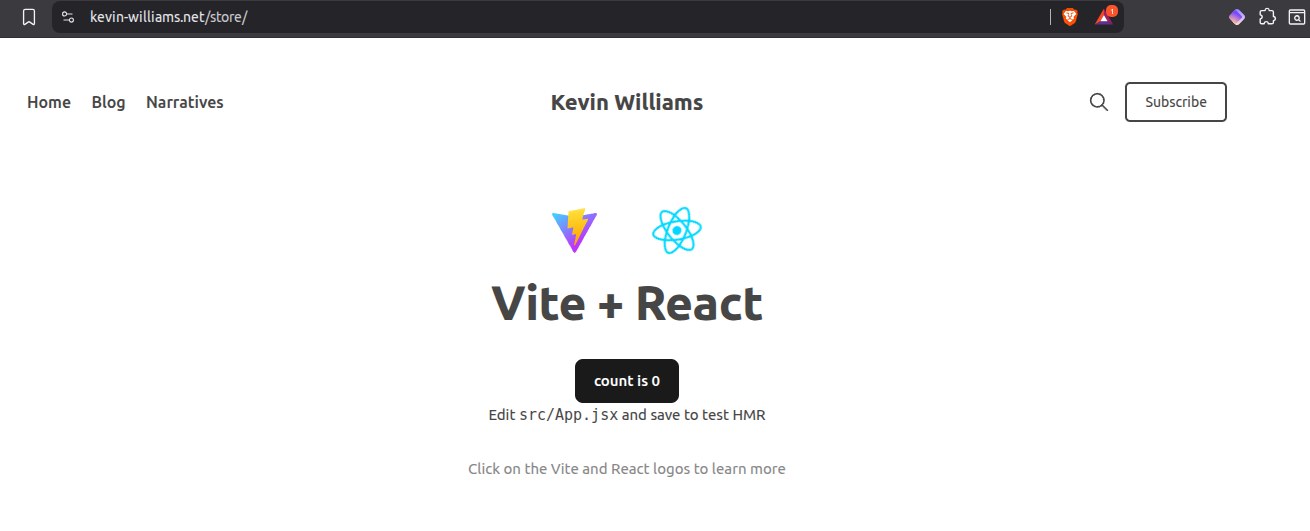
The results? A react app running within my store page, https://kevin-williams.net/store/